U.S. flag

An official website of the United States government

Here’s how you know

Official websites use .gov
A .gov website belongs to an official government organization in the United States.

Secure .gov websites use HTTPS
A lock ( ) or https:// means you’ve safely connected to the .gov website. Share sensitive information only on official, secure websites.

This is a preview of updates coming to the Technical Bulletin's website in early December 2025. Return to current site.
Read more about the modernization release schedule in this announcement.
Comment via the yellow feedback button in the lower right hand corner of the page. Contact the NLM Help Desk with any questions or concerns.

This is archived content.

Links may have become inactive over time. Visit Archive-It   to find the original published layout.

PubMed Advanced Search Page Updated

Canese K. PubMed Advanced Search Page Updated. NLM Tech Bull. 2011 Nov-Dec;(383):e7.

December 02, 2011 [posted]
December 13, 2011 [Editor's note added]

[Editor’s Note: These changes were implemented in PubMed on December 12, 2011.]

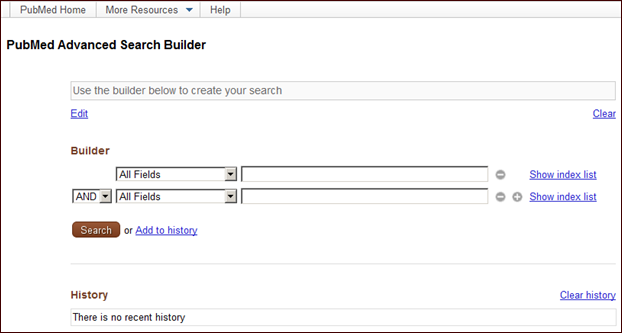
The PubMed® Advanced search page will soon be modified to provide users with a less cluttered, more intuitive way to build searches (see Figure 1).
Screen capture of citationcontext menu.
Figure 1: PubMed Advanced Search Builder page.
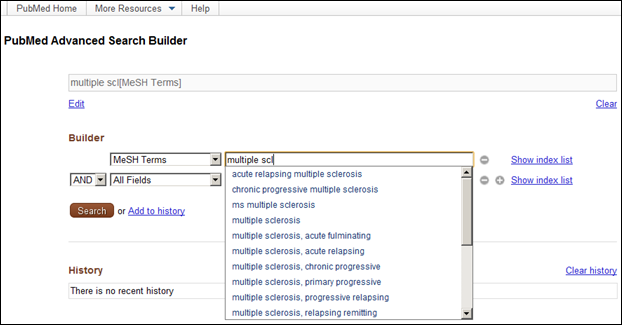
Terms entered in the builder will automatically populate the search box. Users may change the search field from the All Fields pull-down menu, and then enter terms in the search box. Terms entered in the builder will be added with the default Boolean operator AND, unless OR or NOT are chosen from the pull-down menu. Search field menu selections will be rearranged to display by category, e.g., date search fields will be listed together. The MeSH Terms field will also be enhanced to include an autocomplete feature (see Figure 2).
Screen capture of citationcontext menu.
Figure 2: Creating a search using the builder.

Users will be able to remove individual terms from the search box using the builder icons builder icons image next to each selection, or completely clear the search box by clicking Clear.

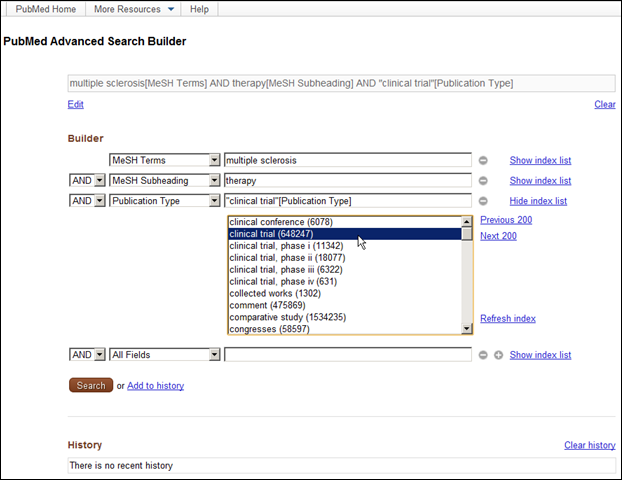
Clicking Show index list will display an alphabetical list of all terms for a specific search field. Clicking a term in the index list display will automatically add it to the search box (see Figure 3).
Screen capture of citationcontext menu.
Figure 3: Show index list for Publication Type.

Clicking Search will run the search in PubMed. Clicking Add to history will add the search to history, to then be used in a subsequent search, if desired (see Figure 4). The Add to history link replaces the Preview button.
Screen capture of citationcontext menu.
Figure 4: History.
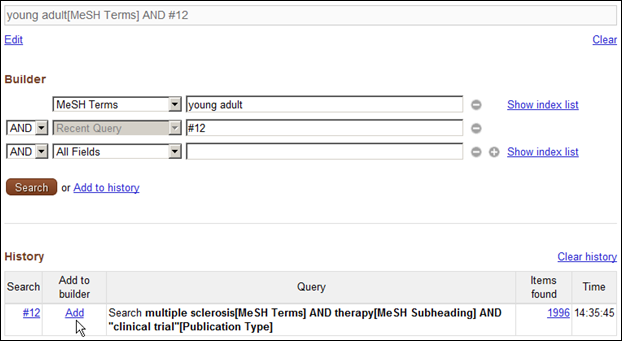
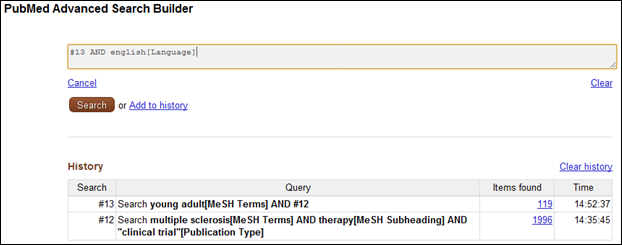
In History, clicking Add next to a history search number will add a previous search to the builder and search box (see Figure 5).
Screen capture of citationcontext menu.
Figure 5: Using a previous search in a subsequent search.
Clicking Edit will permit changes to the final search; however, the builder will be removed from the page since it will no longer control the search. Clicking Cancel will allow you to change your mind and add the builder back to the page (see Figure 6).
Screen capture of citationcontext menu.
Figure 6: Editing the search without the Builder.

For easy accessibility to companion resources, the More Resources section will be moved to the top of the page. This move will subsequently provide room to automatically display up to 100 searches in History (see Figure 7).
Screen capture of citationcontext menu.
Figure 7: More Resources menu expanded.