




This is a preview of updates coming to the Technical Bulletin's website in early December 2025. Return to current site.
Read more about the modernization release schedule in this announcement.
Comment via the yellow feedback button in the lower right hand corner of the page. Contact the NLM Help Desk with any questions or concerns.
This is archived content.
Links may have become inactive over time. Visit Archive-It to find the original published layout.
MedlinePlus® Connect: Linking Electronic Health Records to Consumer Health Information
Dennis S, Miller N, Burgess S. MedlinePlus® Connect: Linking Electronic Health Records to Consumer Health Information. NLM Tech Bull. 2010 Nov-Dec;(377):e6.
November 10, 2010 [posted]
In November 2010, NLM® introduced MedlinePlus Connect, a free service that allows any electronic health record (EHR) system to link to relevant, authoritative and up-to-date health information from MedlinePlus. By incorporating MedlinePlus content into EHR systems, MedlinePlus Connect delivers information about conditions and disorders, health and wellness, and prescription and over-the-counter medications to patients, families, and health care providers when it is needed.
MedlinePlus Connect works by accepting specific requests from EHR systems and providing links to relevant MedlinePlus information in response. To facilitate this connection, NLM mapped all MedlinePlus health topic pages to two standard diagnostic coding systems used in EHRs:
- ICD-9-CM (International Classification of Diseases, 9th edition, Clinical Modification)
- SNOMED CT® CORE Problem List Subset (Systematized Nomenclature of Medicine, Clinical Terms, CORE Problem List Subset)
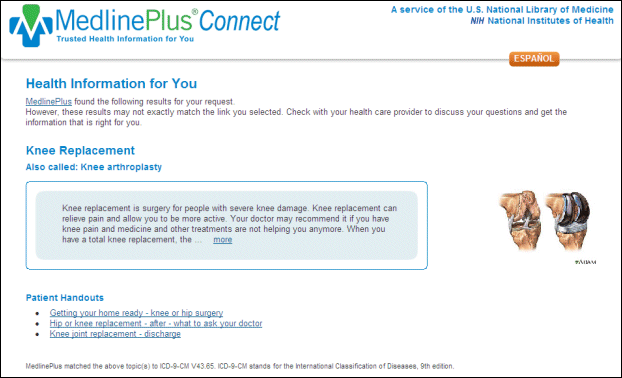
When an EHR system submits a problem or diagnosis code request to MedlinePlus Connect, the service returns the closest matching MedlinePlus health topic(s) as a response. MedlinePlus Connect will return up to three MedlinePlus topics for each requested problem code. On the MedlinePlus Connect response page, the following elements are included for each health topic listed (see Figure 1).
- Topic name linked to the topic page on MedlinePlus
- Synonyms for the topic name, shown as “Also called” (when applicable)
- Topic image
- Abbreviated version of the topic summary linked to the full topic page
- Links to patient handouts (when available)
The response page also identifies the ICD-9-CM or SNOMED CT CORE Problem List Subset code that MedlinePlus Connect matched to the topic(s). MedlinePlus Connect responds to problem code requests in either English or Spanish. The API for using this service conforms to the HL7 Context-Aware Knowledge Retrieval (Infobutton) Knowledge Request URL-Based Implementation specification which you can download.
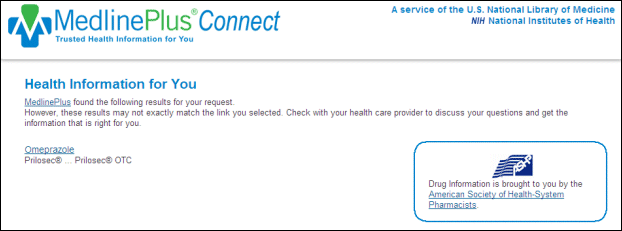
MedlinePlus Connect also links to medication information written especially for patients. When EHR systems send MedlinePlus Connect a request containing a standardized medication code, the service returns links to the most appropriate drug information for prescription and over-the-counter medicines (see Figure 2). For medication requests, MedlinePlus Connect supports the following code systems:
MedlinePlus drug information is the AHFS® Consumer Medication Information and is licensed for use on MedlinePlus from the American Society of Health-System Pharmacists (ASHP), Inc. Currently, MedlinePlus Connect only responds in English to drug information requests.
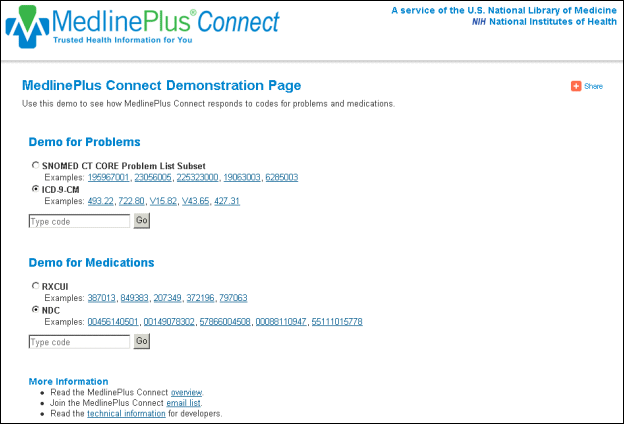
To see how MedlinePlus Connect responds to specific problem code and drug code requests, visit the demonstration page (see Figure 3).
If you are interested in learning how to implement MedlinePlus Connect in your EHR system, visit the overview and technical details pages. In the future, NLM will provide information for laboratory tests through MedlinePlus Connect. Additionally, NLM will add an XML-based Web service as an alternative method to the HL7 Infobutton standard. To stay up-to-date on developments with MedlinePlus Connect or to talk to other organizations that are using it, join the MedlinePlus Connect email discussion list. Send the MedlinePlus Team any questions or feedback via the Contact Us link.