




This is a preview of updates coming to the Technical Bulletin's website in April 2026. Return to current site.
Read more about the modernization release schedule in this announcement.
Comment via the yellow feedback button in the lower right hand corner of the page. Contact the NLM Help Desk with any questions or concerns.
This is archived content.
Links may have become inactive over time. Visit Archive-It to find the original published layout.
PubMed Central® (PMC) — New URL Format
Fogelman M. PubMed Central® (PMC) — New URL Format. NLM Tech Bull. 2009 Nov-Dec;(371):e12.
December 15, 2009 [posted]
The primary advantage of the new format is to enable the PMC site to become more fully integrated with other NCBI resources. The new URL is also more user-friendly — it no longer includes technology-driven terminology, such as Common Gateway Interface (CGI) script name and file extension (see Figure 1).
In the new format, after the NCBI/PMC address, the URL first identifies the type of resource, e.g., the PMC journal list, with subsequent identification for a particular subset of that resource — in this case, the journal number (see Figure 2).


There is now greater flexibility in accessing particular types of material because, in a number of cases, more than one URL can be used for the same resource. In these instances, there is one URL that is considered as primary; however, using any of the other URLs for that resource will redirect you back to the primary (or "canonical") one. For example (see Figure 3), although the first URL, which includes the PubMed Central identifier (PMCID), is the primary way to link to the article, you may also create a URL to obtain access to the article by using other identifiers, such as the PubMed identifier (pmid,) digital object identifier ( doi), or the issn-volume-issue-page (ivip).

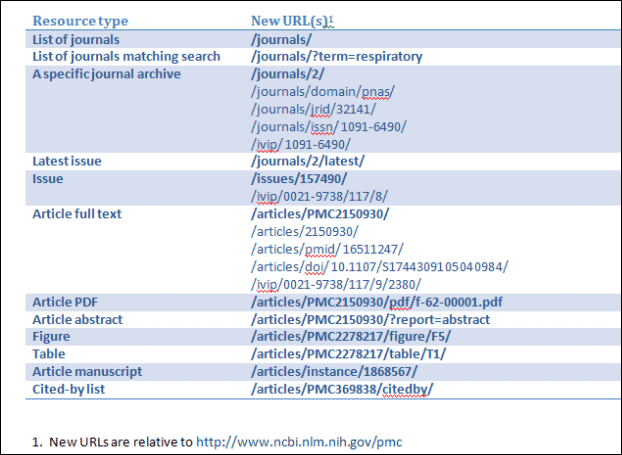
Finally, with the roll-out of these more standardized URLs, as in the table below (see Figure 4), you will also find it easier to modify the Web addresses in your browser. Note that the canonical URL is given first and is shown in bold; the ancillary URLs are listed below it and use samples to indicate the format that should be followed.
The base URL is shown in footnote 1 of Figure 4.
Although the use of the new URLs is now recommended, please also note that we have not completely discarded the old to bring in the new. If you do use the old pubmedcentral.gov URL, it’s not a problem. Your browser will be redirected to the new location.