




This is a preview of updates coming to the Technical Bulletin's website in April 2026. Return to current site.
Read more about the modernization release schedule in this announcement.
Comment via the yellow feedback button in the lower right hand corner of the page. Contact the NLM Help Desk with any questions or concerns.
This is archived content.
Links may have become inactive over time. Visit Archive-It to find the original published layout.
 Skill Kit: The Effects of Year End Processing (YEP) on Saved Searches or RSS Feeds
Skill Kit: The Effects of Year End Processing (YEP) on Saved Searches or RSS Feeds. NLM Tech Bull. 2007 Nov-Dec; (359):e14.
December 27, 2007 [posted]
January 09, 2014
[Editor's note added]
During the several weeks of Year-End Processing (YEP) activities completed MEDLINE®-indexed citations are not added to MEDLINE/PubMed®. Therefore, a My NCBI saved search or RSS feed restricted to MeSH terms (e.g., humans [mh]) would not generate any updates or your automated e-mails may contain the message, "Your search did not retrieve any items." These citations are included in your next scheduled update after YEP activities have concluded.
Upon completion of YEP, in process citations that are within the scope of MEDLINE are replaced as MEDLINE citations indexed with current MeSH® terms, Publication Types, etc. Searches, including My NCBI Saved Searches, containing tagged search terms should now retrieve all applicable MEDLINE records.
The following example shows a typical MeSH term change during YEP and the effect it may have on searches.
Example: MeSH Term Torsion Replaced by Torsion Abnormality
- Before YEP, an untagged search of torsion in PubMed was searched as "torsion"[MeSH Terms] OR torsion[Text Word]
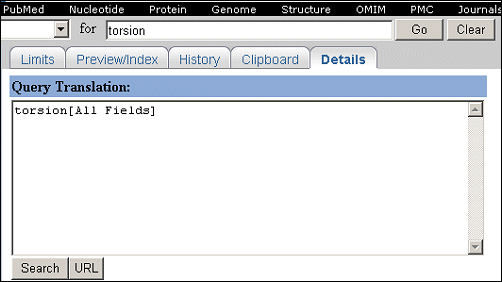
- After YEP, an untagged search of torsion in PubMed is searched as torsion[All Fields]. (See Figure 1.)
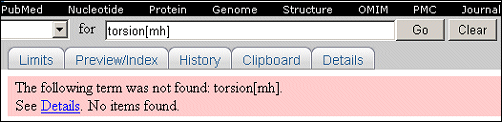
- After YEP, a tagged search of the old term torsion[mh] yields no results. The search fails because torsion was not retained as an Entry Term to the current MeSH Term, Torsion Abnormality. (See Figure 2.)
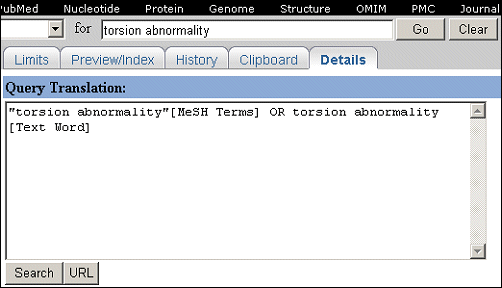
- After YEP, an untagged search of the current MeSH term, Torsion Abnormality, is searched as "torsion abnormality"[MeSH Terms] OR torsion abnormality[Text Word]. (See Figure 3.)
Modifying a Saved Search
You may find that you need to review and update your saved search strategies and RSS feeds. Saved searches and RSS feeds can be modified by running, modifying, and resaving the search or RSS feed. For detailed instructions on modifying a saved search, please view the animated Quick Tour, Changing Saved Searches, or refer to PubMed Help.
[Editor's note: Updated information on how to modify a saved search strategy may be found in the PubMed Tutorial].
Note: Do not use dates (e.g., Entrez or Publication) when creating saved searches or RSS feeds as they may interfere with the strategies employed to find new My NCBI update citations.