




This is a preview of updates coming to the Technical Bulletin's website in early December 2025. Return to current site.
Read more about the modernization release schedule in this announcement.
Comment via the yellow feedback button in the lower right hand corner of the page. Contact the NLM Help Desk with any questions or concerns.
This is archived content.
Links may have become inactive over time. Visit Archive-It to find the original published layout.
 Skill Kit:
Retrieving Citations from a Journal Issue in PubMed®
Skill Kit: Retrieving Citations from a Journal Issue in PubMed®. NLM Tech Bull. 2005 Nov-Dec;(347):e14.
December 19, 2005 [posted]
Skill Kit articles provide search hints, review system features, and cover data and indexing issues for NLM® databases, expanding your search skills and knowledge.
Many researchers and clinicians keep up to date by skimming the contents of their favorite journals. The PubMed® Single Citation Matcher has a fill-in-the-blank form that can be used as a quick way to find the citations included in PubMed for a particular issue of a journal.
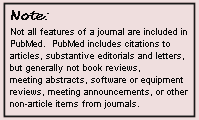
Follow the instructions below, or see and hear the Quick Tour.
1. Click Single Citation Matcher on the PubMed sidebar.
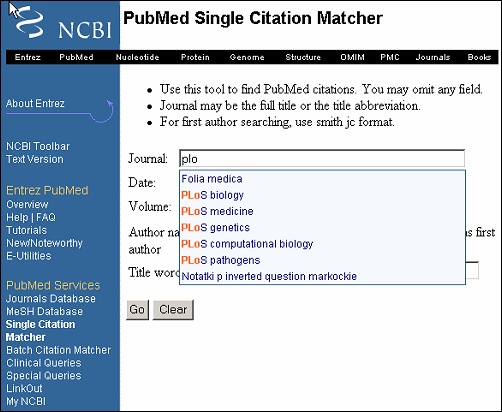
2. Enter the journal title. The journal box includes an autocomplete feature that suggests titles as you enter a title abbreviation or full title. Titles displayed by the autocomplete menu are in ranked order based on the number of citations in PubMed.
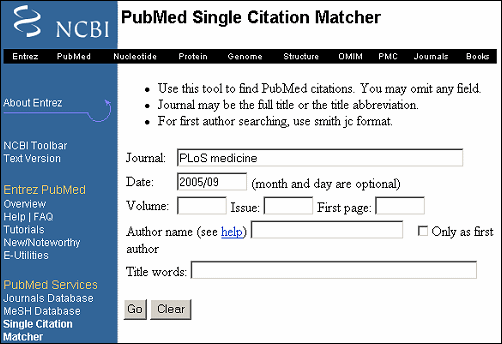
3. Enter volume, issue or date information:
4. Click Go.
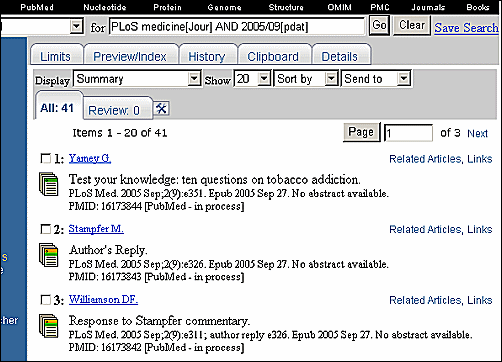
Your retrieval will consist of all of the citations included in PubMed for that issue.