




This is a preview of updates coming to the Technical Bulletin's website in early December 2025. Return to current site.
Read more about the modernization release schedule in this announcement.
Comment via the yellow feedback button in the lower right hand corner of the page. Contact the NLM Help Desk with any questions or concerns.
This is archived content.
Links may have become inactive over time. Visit Archive-It to find the original published layout.
Printer Friendly Format Option Added to PubMed®
Canese K. Printer Friendly Format Option Added to PubMed®. NLM Tech Bull. 2005 Nov-Dec;(347):e9.
November 22, 2005 [posted]
December 01, 2005
[Editor's note added]
[Editor's Note: This feature was implemented in PubMed on November 29, 2005.]
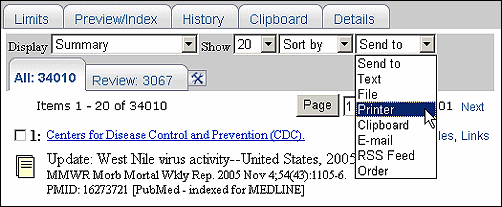
PubMed will soon include a new way to print search results. Use the Printer option under the Send to menu on the search results screen (see Figure 1). Choose the items you want to print and the display format before using the Send to Printer option. If you do not make any selections, the "print page" that is created will include the items in the display format currently shown on the search results screen.
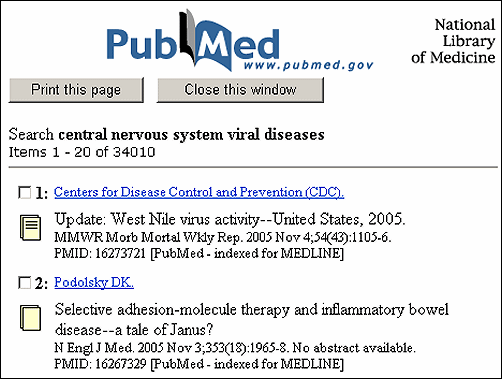
The Send to Printer option creates a print page (see Figure 2). Click "Print this page." Use the Print Dialog box of your operating system to choose your printer and print. Click "Close this window" to return to your search results after printing.
Note: If your Web browser is set to block pop-ups, you may need to allow pop-ups from NCBI or other NLM Web pages to display the PubMed print page.