




This is a preview of updates coming to the Technical Bulletin's website in April 2026. Return to current site.
Read more about the modernization release schedule in this announcement.
Comment via the yellow feedback button in the lower right hand corner of the page. Contact the NLM Help Desk with any questions or concerns.
This is archived content.
Links may have become inactive over time. Visit Archive-It to find the original published layout.
New NLM Learning Resources Database
Helson S. New NLM Learning Resources Database. NLM Tech Bull. 2016 May-Jun;(410):e3.
May 12, 2016 [posted]
The National Library of Medicine (NLM) is pleased to announce the new NLM Learning Resources Database, making it easy to find educational resources for NLM products and services. These materials include videos, tutorials, and handouts on products such as PubMed, ClinicalTrials.gov, Unified Medical Language System, and many more. Now you can find resources using one interface rather than searching different areas of the NLM Web site. An API is also available to auto-populate NLM learning resources on your Web site.
The database currently holds all of the resources previously listed on the former Distance Education Resources Web page. There is a permanent redirect from this page to the NLM Learning Resources Database. Additional resources are being added on an ongoing basis.
Graphical User Interface
The NLM Learning Resources database can be searched or filtered using:
- keywords in the search box (see A in Figure 1)
- to retrieve a list of all resources, search an asterisk (*) in the search box
- a phrase in the search box is treated as separate words ORed together
- subject or product (see B Figure 1)
- Date Last Revised (see C Figure 1)
- archived materials (see D Figure 1)
The Date Last Revised option refers to the last time the learning resource was updated. If the resource has not been revised, the date filter will use the date the resource was created to filter results. The most recently updated resources automatically appear when the database is first accessed or all filters are reset in order to highlight new and interesting videos and materials. Further documentation on how to use the NLM Learning Resources Database is available through the Help button.
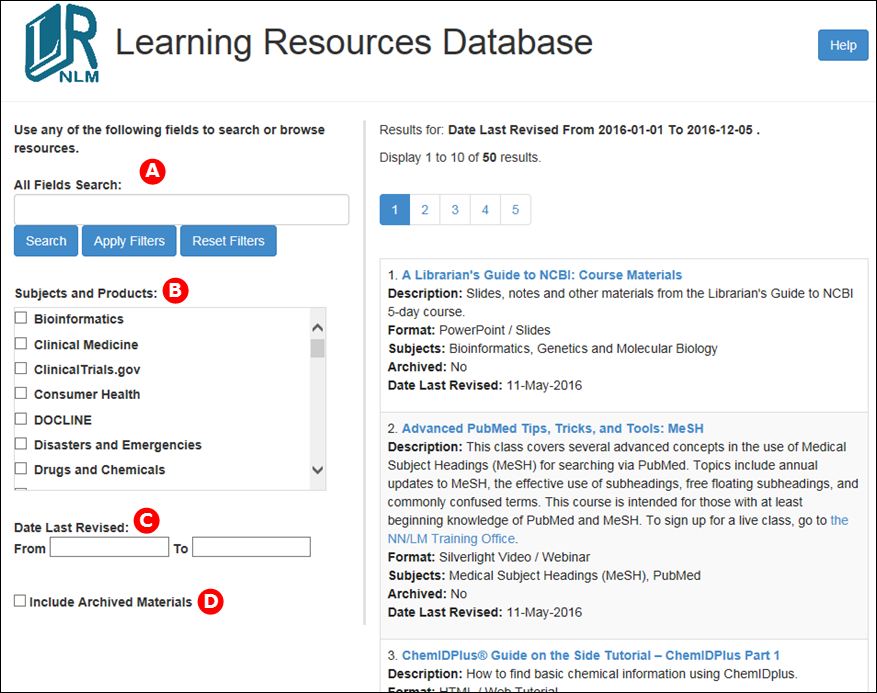
Figure 1: NLM Learning Resources Database homepage.
Application Programming Interface (API)
Use the NLM Learning Resources API to auto-populate NLM learning resources on your Web site. Documentation on how to use the API is available through the Help button. Sample code and examples of pages currently utilizing the API are available under the API for Developers section in the Help.
Finding the NLM Learning Resources Database
The database can be accessed directly using the URL https://learn.nlm.nih.gov/ or the Web-based Training through the Learning Resources Database link on the Training and Outreach section of the NLM Web site (see Figure 2).
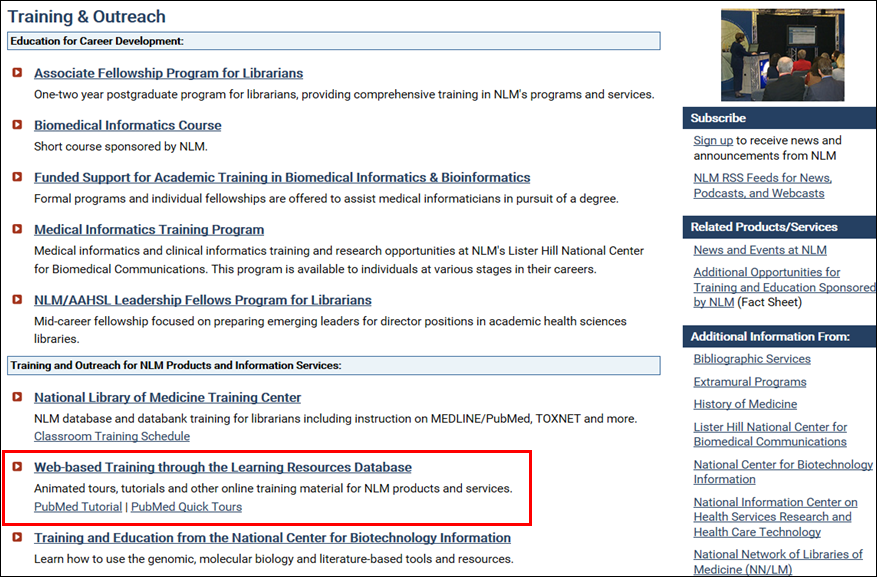
Figure 2: NLM Learning Resources accessed from the Training & Outreach Web page.
See a Presentation of the Database
See a presentation and demonstration of the database at the NLM Theater at the Annual Meeting of the Medical Library Association meeting on May 16 and May 17, 2016. The presentation will be available from the NLM Learning Resources Database.