




This is a preview of updates coming to the Technical Bulletin's website in April 2026. Return to current site.
Read more about the modernization release schedule in this announcement.
Comment via the yellow feedback button in the lower right hand corner of the page. Contact the NLM Help Desk with any questions or concerns.
This is archived content.
Links may have become inactive over time. Visit Archive-It to find the original published layout.
SciENcv — Converting Profiles that Use the Old NIH Biosketch Format to the New NIH Biosketch Format
Hutcherson L. SciENcv — Converting Profiles that Use the Old NIH Biosketch Format to the New NIH Biosketch Format. NLM Tech Bull. 2015 May-Jun;(404):e11.
June 16, 2015 [posted]
The latest SciENcv release has a new feature to help users convert biosketches from the former NIH biographical sketch format to the new biographical sketch format. The NIH Biographical Sketch is required for NIH grant applications.
Log into My NCBI, go to the SciENcv portlet, and click "Manage SciENcv." Select a profile listed as "Old NIH Biosketch" (see Figure 1).
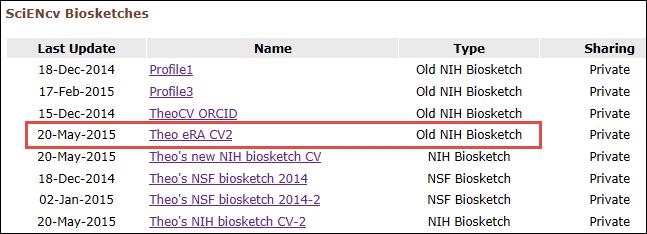
Figure 1: SciENcv main page.
On the selected profile page, click the green button "Upgrade this biosketch" (see Figure 2).
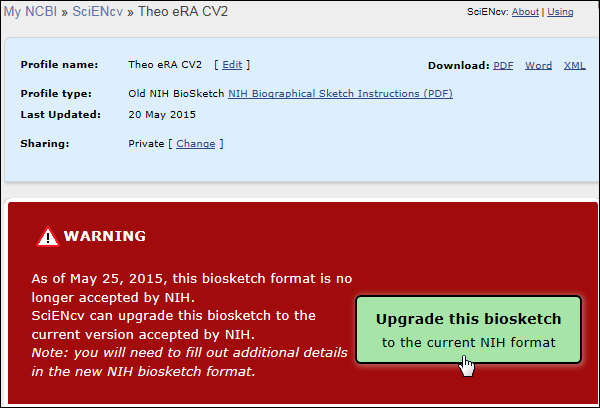
Figure 2: Upgrade this biosketch button.
In the resulting screen, the old NIH Biosketch "Theo eRA CV2" has the word "New" to indicate that this profile is to be converted into the new NIH Biosketch format (see Figure 3). The biosketch name field can be edited, and the sharing status can be changed from the default private to public. After clicking "Create" SciENcv will generate a copy of the profile "Theo eRA CV2" in the new NIH Biosketch format. Note that the new NIH Biosketch format requires additional information which was not part of the previous format. For complete information on the changes to the new NIH Biosketch format in SciENcv, see the article published in January 2015.
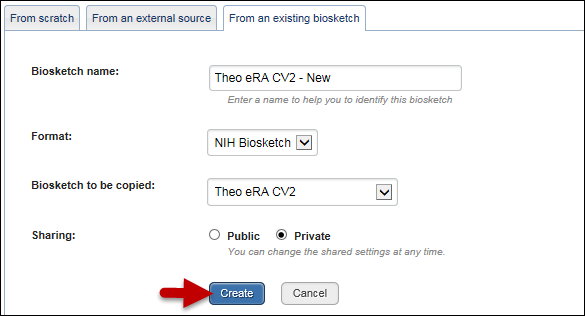
Figure 3: Convert to the new NIH Biosketch format.
The SciENcv main page will continue to store both profiles for the profile "Theo eRA CV2" (see Figure 4).
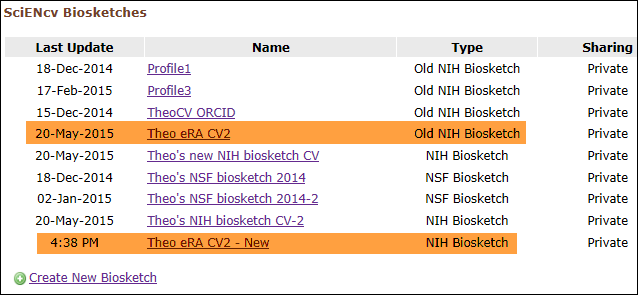
Figure 4: Old and new NIH Biosketches stored in SciENcv.
Please send inquiries or comments to info@ncbi.nlm.nih.gov