




This is a preview of updates coming to the Technical Bulletin's website in April 2026. Return to current site.
Read more about the modernization release schedule in this announcement.
Comment via the yellow feedback button in the lower right hand corner of the page. Contact the NLM Help Desk with any questions or concerns.
This is archived content.
Links may have become inactive over time. Visit Archive-It to find the original published layout.
PubMed® Advanced Search Page Modified
Canese K. PubMed® Advanced Search Page Modified. NLM Tech Bull. 2010 May-Jun;(374):e9.
May 21, 2010 [posted]
June 04, 2010
[Editor's note added]
[Editor's note added June 4, 2010: These changes were implemented in PubMed on June 3, 2010.]
The PubMed Search Builder section of the Advanced Search page will soon be modified to provide users with a more cohesive method to build searches. The Search History and More Resources sections will not change.
The PubMed logo and search box will be replaced with a streamlined search box that is positioned in proximity to the Search Builder and Search History (see Figure 1).
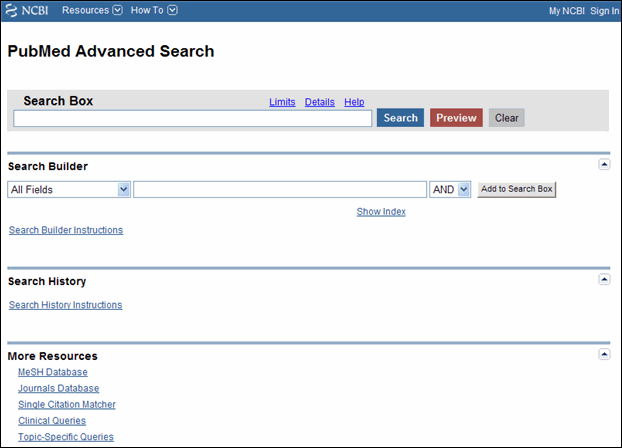
The "Search" and "Preview" buttons will be improved to process search terms present in either the Search Builder box or main search box. In addition, an "Add to Search Box" button will be included to clearly indicate that terms in the Search Builder box should be moved to the main search box before executing a multi-termed query (see Figures 2 and 3).
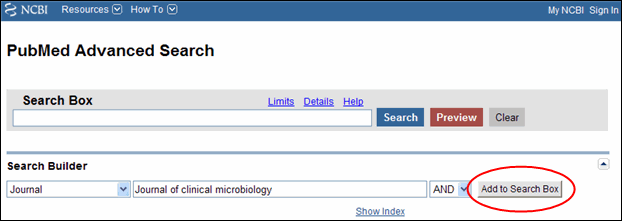
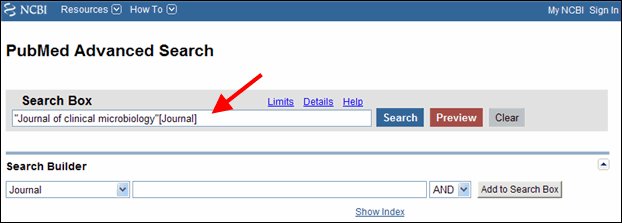
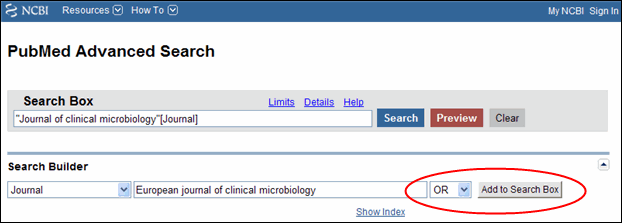
The Boolean operator buttons have been replaced by a pull-down menu. Terms entered in the Search Builder search box will be added with the default Boolean operator AND unless users choose OR or NOT from the pull-down menu, before clicking the "Add to Search Box" button. If both the search box and Search Builder box include terms, the system will combine the terms from both locations with the Boolean operator in the pull-down menu (see Figure 4).
The Index button has been replaced by a Show Index link to allow users to browse by the all fields index, or within a specific field such as MeSH Terms.
The Advanced Search page sections may be closed or opened using the triangle collapse button located on the right-side of each section's label.
In order to allow users to efficiently build their search using the search builder and history, the simplified search box will not include autocomplete. In addition, RSS and the save search feature will not be offered.