This is a preview of updates coming to the Technical Bulletin's website in April 2026. Return to current site.
Read more about the modernization release schedule in this announcement.
Comment via the yellow feedback button in the lower right hand corner of the page. Contact the NLM Help Desk with any questions or concerns.
This is archived content.
Links may have become inactive over time. Visit Archive-It to find the original published layout.
Related Records in Catalog Feature Available in NLM® Catalog
Willis S. Related Records in Catalog Feature Available in NLM® Catalog. NLM Tech Bull. 2008 May-Jun; (362):e14.
June 25, 2008 [posted]
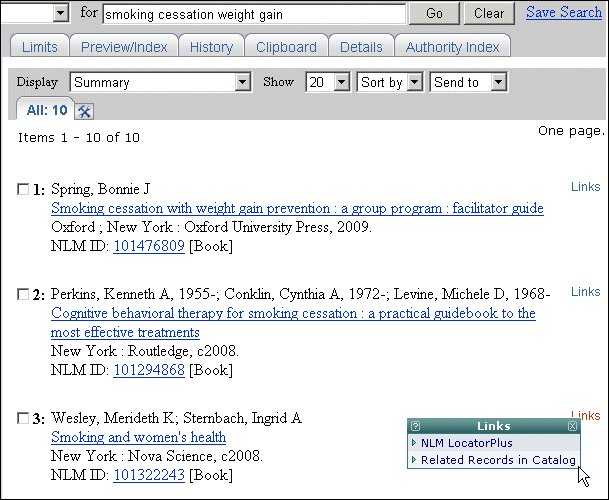
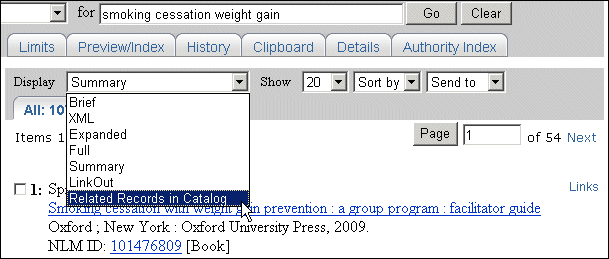
A Related Records in Catalog feature has been added to the NLM Catalog. It is available from the Links menu(see Figure 1). It can also be selected from the Display menu near the top of the screen (see Figure 2).
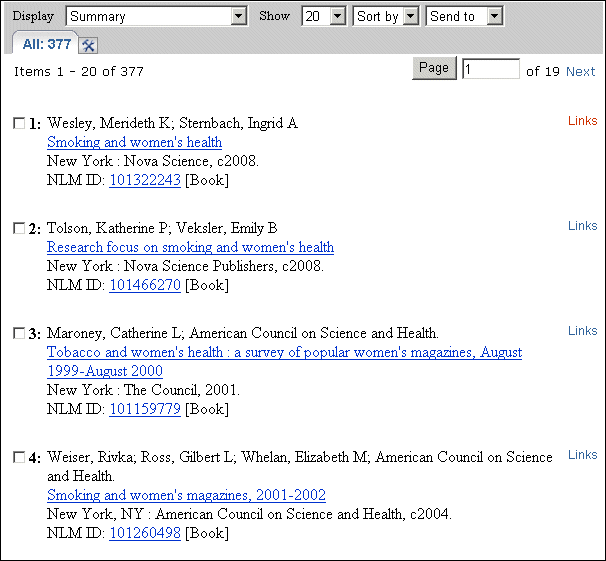
The Related Records of a catalog citation are other catalog citations most similar to it. Similarities are determined by comparing words in the titles of and Medical Subject Headings (MeSH®) assigned to catalog records. Since similarities are determined using MeSH terminology, Related Records are not calculated for catalog items that do not have MeSH. Related Records are pre-calculated. These calculations are updated on a regular basis. The related records are displayed in ranked order from most to least related, with the "linked from" citation displayed first (see Figure 3).
Notes:
- If Related Records is selected from the Display menu without selecting specific citations, NLM Catalog retrieves the related records for all the citations displayed on the page .
- The Related Records feature is not available for records that do not have MeSH.
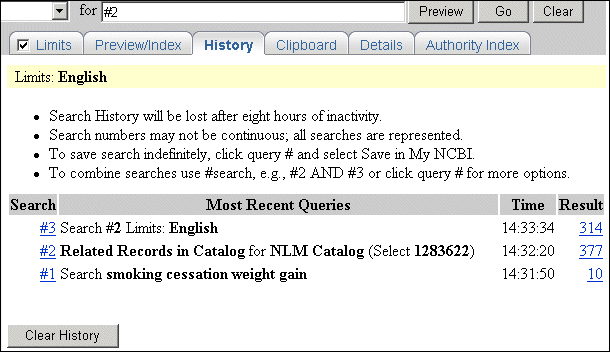
Limits are disabled when the Related Records feature is used. However, the list of Related Records can be refined by selecting History from the Features Bar, then using the search statement number in combination with another concept. In History, the Related Records are represented as "Related Records in Catalog for NLM Catalog (Select [NLM Catalog Unique Identifier Number])" (see Figure 4).