




This is a preview of updates coming to the Technical Bulletin's website in April 2026. Return to current site.
Read more about the modernization release schedule in this announcement.
Comment via the yellow feedback button in the lower right hand corner of the page. Contact the NLM Help Desk with any questions or concerns.
This is archived content.
Links may have become inactive over time. Visit Archive-It to find the original published layout.
NCBI Beta Version of Advanced Search Available
Canese K. NCBI Beta Version of Advanced Search Available. NLM Tech Bull. 2008 May-Jun; (362):e7.
May 16, 2008 [posted]
December 23, 2008
[Editor's note added]
[Editor's note: Read about additional improvements made to the Advanced Search screen in the article, PubMed® Advanced Search Evolves.]
The National Center for Biotechnology Information (NCBI) is developing an Advanced Search option for PubMed®. A beta version (which may undergo changes) has been released for users to try. Look for the link next to the search box buttons (see Figure 1). Comments can be sent to NCBI via the "Write to the Help Desk" link at the bottom of the screen and will be helpful in developing the design and format of this feature.

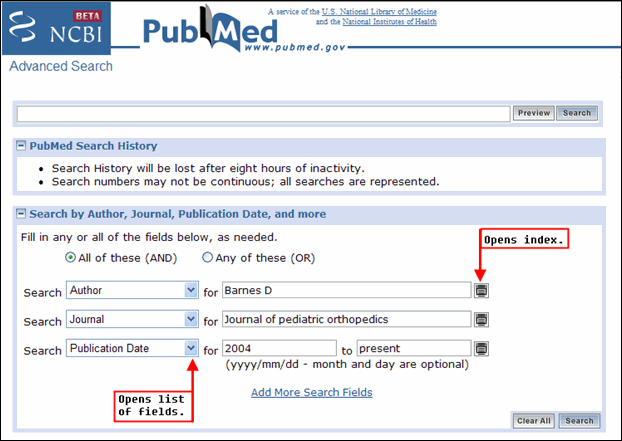
PubMed Advanced Search has a search box at the top (see Figure 2). The last search will display, or you can enter terms directly here.
Beneath the search box there are four sections: PubMed Search History; Search by Author, Journal, Publication Date, and more; Limit by Topics, Languages, and Journal Groups; and Index of Fields and Field Values. All sections are open by default. Click the plus/minus box next to each feature to close or open a section.
Search by Author, Journal, Publication Date, and more
Search by Author, Journal, Publication Date, and more can be used to search for terms within selected fields (see Figure 2). The default three lines are set up for Author, Journal, and Publication date searching. They can be changed to other fields using the pull-down menu. Author and Journal have the auto-complete feature for entering terms. The index icon on the right of each line can be used to display the index of searchable terms for the displayed search field, so you can browse and select a term. One term can be entered per line. Add more lines by clicking on "Add More Search Fields." The lines can be combined with either an AND or OR operator.
PubMed Search History
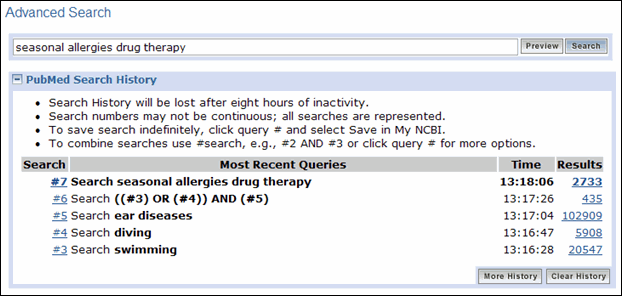
History displays the last five searches. When there are more than five, click on "See more History" to see the full display (see Figure 3). Searches can be combined in the same ways as with the current History feature. In addition to the plus/minus box, this section can be opened by using the Preview button.
Limit by Topics, Languages, and Journal Groups
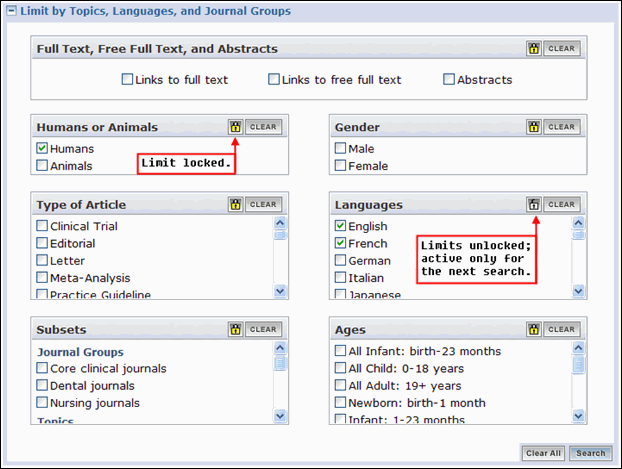
As with the current Limits feature, use the check boxes in this section to add limits to your search. Limits are, by default, active for subsequent searches. This is indicated by the yellow locks. If you want one or more limits from a section (e.g., English, French) only for your next search, click the lock icon. It will unlock and turn white indicating the selection will be used only for the next search – not subsequent searches (see Figure 4).
Index of Fields and Field Values
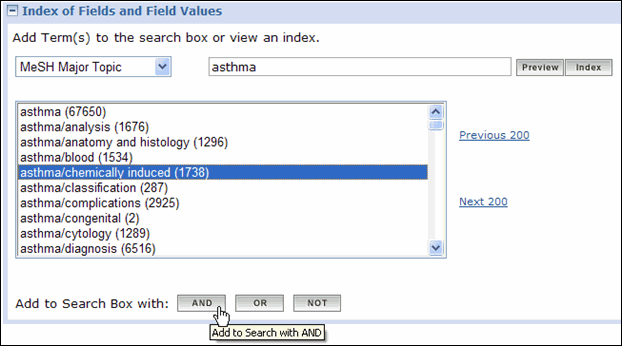
Use this section to browse and select terms from the indexes of various searchable fields. Pick the field of interest from the pull-down menu, enter a term, and click on the Index button. You may highlight multiple terms from the index to add to your search using the AND, OR, or NOT operators. Or, you can preview the results in Search History by clicking the Preview button (see Figure 5).
Future plans
During upcoming weeks we will determine the usefulness of the Advance Search beta site. Based on our findings and feedback from users we will make changes to this feature and to other parts of PubMed accordingly.