




This is a preview of updates coming to the Technical Bulletin's website in early December 2025. Return to current site.
Read more about the modernization release schedule in this announcement.
Comment via the yellow feedback button in the lower right hand corner of the page. Contact the NLM Help Desk with any questions or concerns.
This is archived content.
Links may have become inactive over time. Visit Archive-It to find the original published layout.
Save PubMed Data in CSV Format
McGhee M. Save PubMed Data in CSV Format. NLM Tech Bull. 2011 Mar-Apr;(379):e17.
April 07, 2011 [posted]
March 17, 2025
[Editor's note added]
Editor's note: Refer to the PubMed User Guide for the most up-to-date instruction.
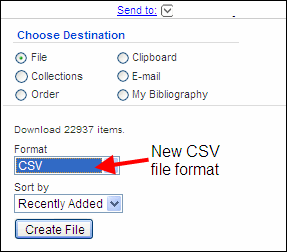
You can now save PubMed® data in Comma-Separated Values (CSV) formatted files. CSV files are used to easily import data into databases and spreadsheets.
To save PubMed data in CSV format, use Send to File (see Figure 1). Under Format, select CSV and click Create File. Save the file on your computer. You can import the saved file into other software programs.
See PubMed Help for more information about saving citations as a text file.