




This is a preview of updates coming to the Technical Bulletin's website in April 2026. Return to current site.
Read more about the modernization release schedule in this announcement.
Comment via the yellow feedback button in the lower right hand corner of the page. Contact the NLM Help Desk with any questions or concerns.
This is archived content.
Links may have become inactive over time. Visit Archive-It to find the original published layout.
Catalog Display Changes for Journal Titles Not in the NLM Collection
Catalog Display Changes for Journal Titles Not in the NLM Collection. NLM Tech Bull. 2018 Jan-Feb;(420):e1.
January 08, 2018 [posted]
Beginning in 2018, LocatorPlus and the National Library of Medicine (NLM) Catalog displays were modified to better indicate which journals were not selected for the NLM collection.
LocatorPlus and the NLM Catalog are public search interfaces to the bibliographic data about the NLM collection. Finding a record for a journal in either LocatorPlus or the NLM Catalog does not necessarily mean that NLM collects the title.
A journal record may be added to the catalog for the following reasons:
- the journal is selected for the NLM collection;
- to support the processes of NLM products and services such as PubMed Central (PMC), MEDLINE, GenBank, interlibrary loan, and others.
NLM considers hundreds of journals annually but many are not selected for the collection. These journals may not be selected because they are out of scope, or because they do not demonstrate sound editorial practices, effective peer review or scientific merit. Journal selection is based on the journal guidelines from the NLM Collection Development Manual. The journal record in the catalog indicates the Library's decision. Not selected journal title records may support:
- the NIH Public Access Policy and research articles deposited in PMC as a result of NIH funding;
- DOCLINE libraries in the United States, Canada, and Mexico, members of the National Network of Libraries of Medicine, which perform interlibrary loan and document delivery services.
In LocatorPlus (see Figure 1), a not selected journal can be identified in the "Summary View" from:
- Electronic Links: Access not provided by NLM
- Location: Not at NLM
- Call Number: Not selected
- Location: Not at NLM
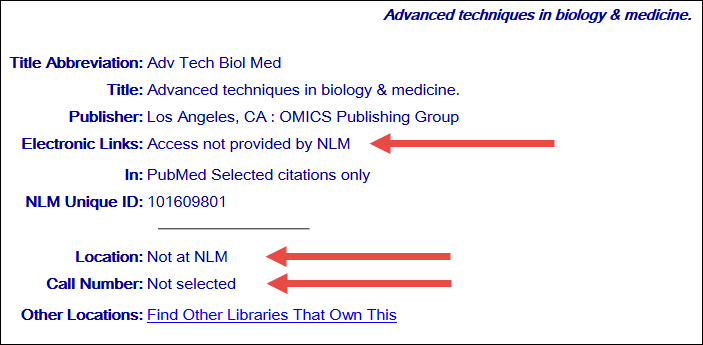
Figure 1: LocatorPlus Summary View Record Display.
In the NLM Catalog (see Figure 2), a not selected journal can be identified in the "Full View" from:
- Electronic Links: Access not provided by NLM
- Collection Status: Not in the NLM Collection
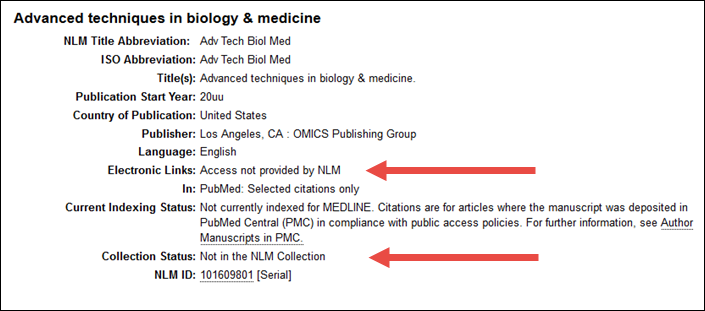
Figure 2: NLM Catalog Full View Record Display.
NLM no longer provides electronic links to journals that are not in the collection.
We welcome your questions. To contact us, please use the NLM Customer Support portal.