




This is a preview of updates coming to the Technical Bulletin's website in April 2026. Return to current site.
Read more about the modernization release schedule in this announcement.
Comment via the yellow feedback button in the lower right hand corner of the page. Contact the NLM Help Desk with any questions or concerns.
This is archived content.
Links may have become inactive over time. Visit Archive-It to find the original published layout.
New Look for the NIH Manuscript Submission System
Funk KM. New Look for the NIH Manuscript Submission System. NLM Tech Bull. 2015 Jan-Feb;(402):e5.
February 03, 2015 [posted]
On January 28, 2015, the NIH Manuscript Submission System (NIHMS) got a new look. In addition to a new interface design, the update streamlines the login and manuscript submission processes and provides relevant help information directly on each screen. See the illustrations below for more detail.
Homepage
The NIHMS sign-in routes are available from the homepage. Select a route based on your funding agency (see A in Figure 1) or sign in through NCBI if you are starting a submission on an author’s behalf (see B in Figure 1).
The homepage also includes a graphic overview of the NIHMS process (see C in Figure 1). You can hover over each step for more information or click "Learn More" to read the complete overview in the FAQ. Note: The steps of the NIHMS conversion process remain the same. An author or principal investigator (PI) (i.e., Reviewer) must still complete the Initial Approval and Final Approval steps. Updated help documentation and FAQs help you navigate the process.
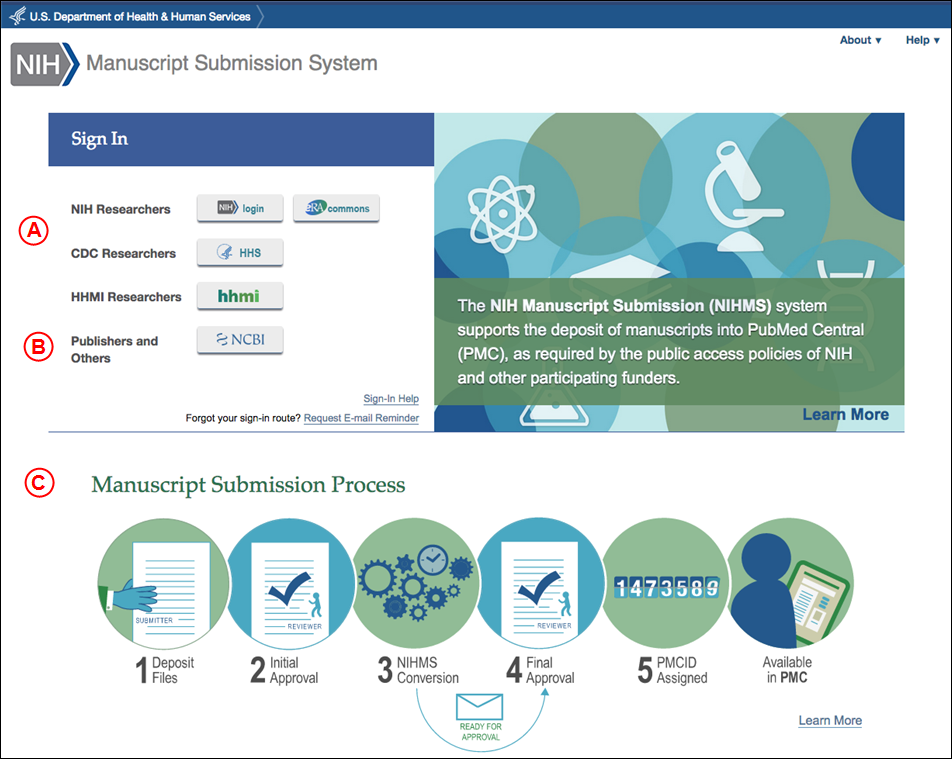
Figure 1: NIHMS homepage.
Managing Manuscripts
Once you are signed in to NIHMS, you will be directed to your Manuscript List (see Figure 2). From this page you can:
- manage and track your existing submissions (see A in Figure 2)
- submit a new manuscript (see B in Figure 2)
- search for a record (see C in Figure 2)
You can also click on any headings in the information box (see D in Figure 2) to expand a topic and read the help text.
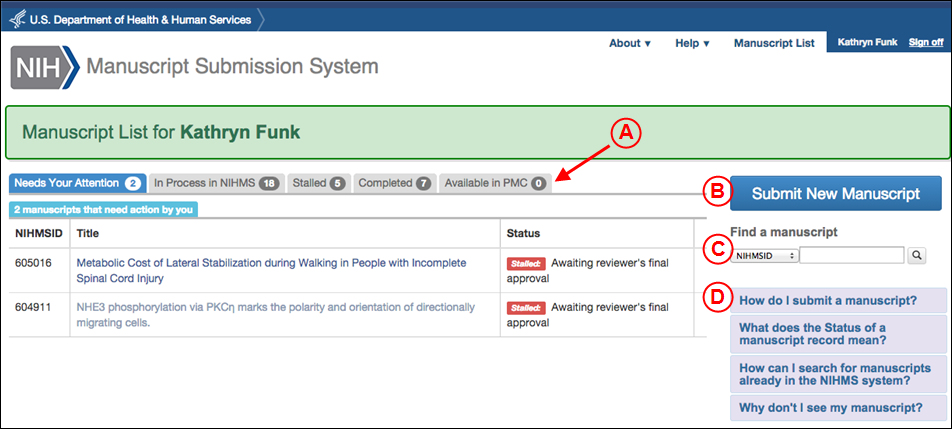
Figure 2: Manage and track submissions from the Manuscript List page.
Submit a New Manuscript
The initial submission still requires you to enter both a manuscript and journal title, deposit complete manuscript files, and specify funding information and the embargo.
Key updates include:
- an NIHMSID is assigned to a record only after files have been uploaded; for example, at the Check Files step (see A in Figure 3)
- a streamlined deposit process with clearly defined and explained actions in each step (see B in Figure 3)
- the Submitter is required to open the PDF Receipt to review the uploaded files and confirm that the submission is complete before advancing to the next step (see C in Figure 3)
- relevant help information available on each page (see D in both Figures 2 and 3)
- the Reviewer is required to add funding before approving the initial deposit
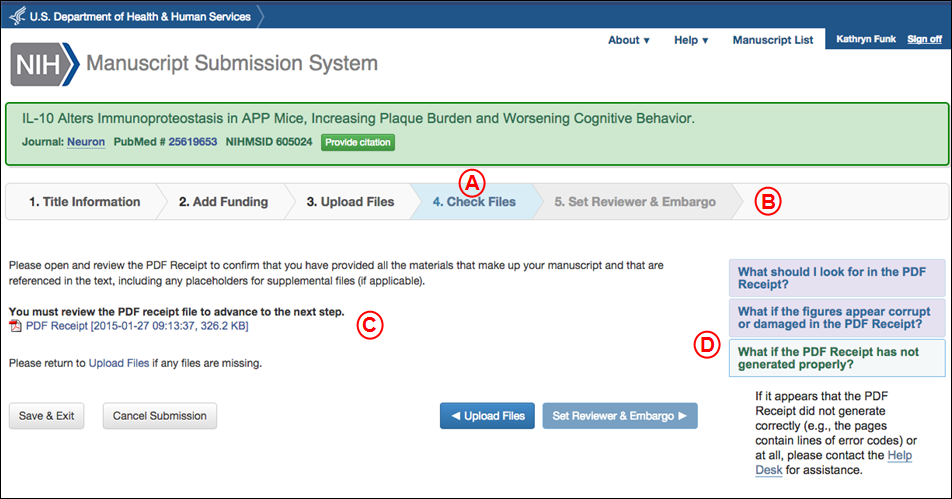
Figure 3: The manuscript deposit process.
Please direct your questions to nihms-helpdesk@ncbi.nlm.nih.gov.