




This is a preview of updates coming to the Technical Bulletin's website in April 2026. Return to current site.
Read more about the modernization release schedule in this announcement.
Comment via the yellow feedback button in the lower right hand corner of the page. Contact the NLM Help Desk with any questions or concerns.
This is archived content.
Links may have become inactive over time. Visit Archive-It to find the original published layout.
 Skill Kit: Searching for Phrases in PubMed®
 Skill Kit: Searching for Phrases in PubMed®
Skill Kit: Searching for Phrases in PubMed®. NLM Tech Bull. 2011 Jan-Feb;(378):e4.
January 13, 2011 [posted]
October 15, 2012
[Editor's note added]
[Editor's Note: Example 2 and the final note were updated on October 15, 2012.]
This Skill Kit shows you how to search for phrases in PubMed. There are two steps, but usually Step 1 is sufficient.
Example 1
Step 1: Search the phrase without quotes or search tags.
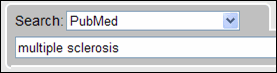
Then check Search details to see how PubMed Automatic Term Mapping (ATM) translated the search.
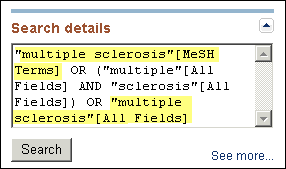
The phrase, multiple sclerosis, is searched as a MeSH term as well as a phrase in other fields of the record. There is also something else happening that you cannot easily see in the Search details. The more specific terms under multiple sclerosis in the MeSH hierarchy are also being searched. This is called automatic explosion and the additional MeSH terms that are searched in this example are:
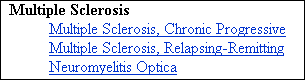
Automatic explosion is beneficial because NLM staff use the most specific MeSH term when assigning subject access points to MEDLINE® records.
Step 2: Search the phrase in quotes. This is only necessary if your phrase is not searched as a phrase in Step 1. In this example Step 1 is sufficient and Step 2 is not necessary.
Let’s look at another example.
Example 2
Step 1: Search the phrase without quotes or search tags.

Then check Search details to see how ATM translated the search. Search details shows that the phrase was not searched as a phrase.
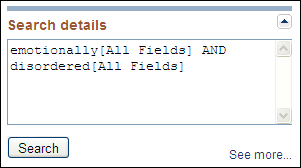
Step 2: Search the phrase in quotes.

Now Search details shows the phrase was searched.
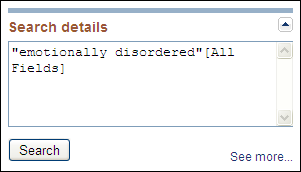
Warning! Searching a phrase using double quotes turns off automatic mapping to MeSH terms. For example, "heart attack" will not map to the MeSH term Myocardial Infarction, whereas, heart attack will.
One final note: Not all phrases are recognized in PubMed, e.g., hourly injection. In this case, the search results will be the same for Steps 1 and 2. Without quotes hourly injection is searched as:
- hourly[All Fields] AND ("injections"[MeSH Terms] OR "injections"[All Fields] OR "injection"[All Fields])
Likewise, with quotes "hourly injections" is searched as:
- hourly[All Fields] AND ("injections"[MeSH Terms] OR "injections"[All Fields] OR "injection"[All Fields])
When a quoted term is not searched as a phrase, the following message appears above the search results:

If your phrase is not recognized by PubMed but you think it should be, write to the PubMed Help Desk.
For additional information about searching for a phrase, see the PubMed Help.